


Table of Contents
Most business owners think Google reviews are just about looking good on Google maps.
If you’re in that camp, let me show you why Google reviews are the key to local SEO.
I used to think the same thing. Then I started digging into what actually moves the needle on local rankings, and guess what keeps showing up? Reviews.
Not just any reviews – the right kind of reviews, collected the right way.
Here’s the truth: Google reviews aren’t optional anymore.
They’re not a “nice to have.” They’re a direct ranking signal that Google uses to decide whether your business shows up in the map pack – that coveted top-three results when someone searches for a service near them.
They also have a big impact on whether or not AI LLMs like Gemini, ChatGPT and Grok will recommend your business when someone asks.
And unlike most SEO tactics that cost money and take months, getting reviews is free.
All you have to do is ask. And yet, most businesses won’t do it.
This guide is going to break down exactly how Google reviews impact your local SEO, how to get more Google reviews, and how to handle the ugly ones when they show up.
No fluff. Just what I’ve learned from optimizing hundreds of sites and watching what actually moves the needle.
Let’s get into it.
How Google Reviews Impact Local SEO
Google’s local algorithm is surprisingly transparent about what matters. They tell us directly: local results are based on relevance, distance, and prominence.
Relevance is how well your business matches what someone is searching for. Distance is… well, distance. But prominence? That’s where reviews come in.
Prominence measures how well-known your business is. And Google has explicitly stated that “more reviews and positive ratings can help your business’s local ranking.”
Here’s what that means in practice:
Review quantity matters. Google sees a steady stream of reviews as a signal that your business is active.
If you went to a website that looks like it hasn’t been updated in years, you’d click away. Google does the same thing.
A consistent review history tells Google “this business is alive and serving customers.”
Average rating matters. Here’s one most people miss: Google adds a “Top-rated” filter automatically when someone searches with “best” or “top” in their query.
And here’s the kicker – you need at least a 4.0-star rating to even qualify. Below that? You’re invisible for some of the highest-intent searches out there.
Review recency matters. Review velocity is a major ranking signal. So many businesses get a bunch of reviews and then think they have enough and stop trying. This is a critical mistake.
Getting 50 reviews in one month and then nothing for a year looks suspicious. Google wants to see consistent, ongoing engagement.
We’ll talk more about how to build that into your workflow later.
One of the biggest ranking factors is how many reviews your business has collected per month on average in the last 90 days.
Pro tip: you can check the top 3 ranked businesses to see how many reviews they have collected in the last 90 days to get an idea of where your business needs to be.
If you aren’t consistently getting more reviews, you are losing.
The Keyword Question
One of the most common debates in SEO circles: do keywords in your reviews help your rankings?
The answer is nuanced.
Google can pull relevance signals from review text. If someone searches “best law firm in Atlanta” and your reviews mention “Atlanta law firm,” that’s relevant.
But here’s what the research shows: it’s nearly impossible to separate the impact of keyword-rich reviews from the simple fact that you’re getting more reviews in general.
My take? Don’t stress about begging customers to use specific keywords.
Focus on getting detailed reviews that naturally mention services and locations. That’s what Google is really looking for.
The SEO Impact of Review Signals
Let’s get granular. What exactly does Google look at when it comes to reviews?
Review Count
This is the most straightforward signal. More reviews generally equal better rankings, all else being equal.
But here’s what most people miss: it’s not just about the total number. It’s about what that number says about your business.
A business with 500 reviews looks more established than one with 10. Google treats that as a trust signal.
Average Rating
We’ve already hit the 4.0 threshold for “best” searches. But there’s another angle: click-through rate.
Get your review link from your Google Business Profile dashboard (it’s under “Ask for reviews”).
Shorten it using a URL shortener, and make sure it goes directly to the review form.
For businesses with physical locations, generate a QR code that links to your review page. Put it on receipts, in follow-up emails, even on a sign at your front desk.
Response Rate
Google has officially confirmed that responding to reviews is a ranking factor.
When you respond, you’re signaling engagement. You’re showing Google that you care about your customers and your online presence.
We’ll cover response tactics in depth later, but the short version is: respond to every review. Yes, even the negative ones.
Photo Reviews
This is an underused weapon.
Reviews with photos tend to stay at the top of your review list longer. Why? Because Google prioritizes content that provides more value to searchers.
A photo of the HVAC system you fixed, the smile on a dental patient’s face, or the patio you installed – that adds context that text alone can’t match.
I recommend making photo requests part of your review-asking process. We’ll get into exactly how to do that later.
How to Get More Google Reviews
This is where most businesses drop the ball.
They provide great service, assume customers will naturally leave reviews, and then wonder why their competitors with half the talent have ten times the reviews.
Here’s the reality: unless someone had an extreme experience (really good or really bad), most people don’t think to leave a review. They’re busy. It slips their mind. The default is silence.
You have to ask. And you have to make it stupid-simple.
The Review Ask Formula
Getting more reviews comes down to three things:
- Timing – Ask at the right moment
- Method – Use the right channel
- Ease – Make it as frictionless as possible
Get all three right, and your review volume will explode. Miss one, and you’ll struggle.
When to Ask (Timing)
The perfect time to ask for a review is when the customer is happiest. That’s usually right after you’ve delivered the service or completed the sale.
- For a dentist: right after the cleaning, when they’re happy with how clean their teeth feel
- For a plumber: after you’ve fixed the issue and they’ve seen the work
- For a lawyer: after you’ve resolved their case or hit a milestone
The emotional peak is when people are most willing to take 30 seconds to help you out.
In-Person Ask Techniques
If you’re face-to-face with customers, use it. A personal ask is the most effective method.
The verbal script:
“Hey, we’re trying to build our online presence a bit. If you had a good experience today, would you mind taking 30 seconds to leave us a quick review on Google? It really helps small businesses like ours.”
That’s it. Simple. Not pushy. Gives them an out.
Notice I didn’t say “Would you give us a 5-star review?” Because that sounds like you’re begging. And definitely don’t offer anything in exchange – Google prohibits incentivized reviews, and it can get your reviews removed.
Training your team:
If you have employees who interact with customers, train them to ask. Make it part of the closing process. “Thanks for coming in! Can I ask you a big favor? It would really help us out if you would leave us a review on Google. Would you mind doing that for me?”
When they say “Yes” then you follow up with, “thank you so much. I will text you a link to our profile to leave a review.”
Most employees won’t do it naturally. You have to make it part of the workflow.
Digital Review Request Workflows
Not every business sees customers in person. For many, the relationship is digital. That’s where email and SMS come in.
Email automation:
Set up an automated email sequence that goes out 1-2 days after service completion. The timing matters – too soon and they’re still thinking about the transaction, too late and the moment has passed.
SMS/Text requests:
Text messages have ridiculously high open rates. A simple text with a direct link to your review page can work wonders.
The Review Link
This is crucial. Don’t make customers hunt for where to leave a review.
Get your review link from your Google Business Profile dashboard (it’s under “Ask for reviews”). Shorten it using a URL shortener, and make sure it goes directly to the review form.
For businesses with physical locations, generate a QR code that links to your review page. Put it on receipts, in follow-up emails, even on a sign at your front desk.
If you’re using Prosperly to send out review requests, we automatically include it in our pre-made templates.
SMS Review Request Template
“Hey [First Name], thanks for choosing [Business Name]! If you had a great experience, would you take 30 seconds to leave us a quick review? It helps us grow! [review link]”
Short. Direct. Includes the link.
Email Review Request Template #1
Subject: Quick favor?
Hey [First Name],
Thanks again for choosing [Business Name]. Can you do me a huge favor? Reviews make a big difference for a small business like ours. Would you mind taking 30 seconds to leave us a review?
Here’s the link: [review link]
Thanks so much!
[Your Name]
Email Review Request Template #2 - First Follow Up
Subject: Hey [First Name]
Hi [First Name],
I know you’re super busy. It would mean so much if you could take 30 seconds to leave us a review.
It helps us continue to improve and reach more people who need what we offer.
Here’s the link again: [review link]
Best,
[Your Name]
Probably want to send this 2-3 days after the previous message.
Responding To Google Reviews
I’ve said it already, but it bears repeating: responding to reviews is a ranking factor. But beyond SEO, it’s also one of the most powerful trust signals you can send to potential customers.
You’ll notice that any time you get a new review Google will email whoever the admin on the Google Business Profile is asking them to reply to the review as soon as possible.
Google wants you to respond to every review within 24 hours. And you need to do it.
This is another signal that your business is alive, doing business and active on Google maps.
Not to mention, when someone is researching your business, they don’t just read your reviews. They read how you respond to them.
Responding to Positive Reviews
Keep it warm. Keep it brief. Add a little something specific to show you’re not using a template.
Template examples:
“Thank you so much, [Name]! We’re thrilled to hear you had a great experience. We truly appreciate you taking the time to share this. See you next time!”
“We loved having you, [Name]! Thanks for the kind words about [specific thing they mentioned]. We’re glad we could help. Looking forward to seeing you again!”
Notice I added specific details. That takes an extra 10 seconds but makes a huge difference.
Responding to Negative Reviews
This is where most businesses panic. Don’t.
Negative reviews aren’t the end of the world. In fact, a few negative reviews can actually build trust.
Perfect 5-star ratings can look fake. Some 4-star reviews with thoughtful business responses look authentic.
But you have to respond the right way.
The framework:
- Acknowledge the issue
- Apologize (sincerely, even if you think they’re wrong)
- Take it offline
- Invite them to contact you directly
Template:
“I’m sorry to hear about your experience, [Name]. That’s not the level of service we strive for. We’d like to make this right – please contact us directly at [phone/email] so we can discuss this further. We value your feedback and would love the chance to turn this around.”
Key elements:
- You apologize for their experience (not necessarily for what happened)
- You don’t argue or get defensive
- You offer to take it offline
- You provide contact info
Never use a template for negative reviews. Read what they actually said and respond specifically to their concerns.
If you follow this advice with responding to negative reviews, you will actually leverage those negative reviews to get more customers.
Why? Because one of the biggest points of friction for people choosing a new business, is how that business is going to treat a customer when things go wrong.
When you show that your empathetic and responsive, that lowers the defensiveness of a potential customer.
Handling Negative Reviews
Sometimes a negative review crosses the line. Maybe it’s fake. Maybe it violates Google’s policies. Maybe it’s just wrong.
Here’s what you need to know about getting reviews removed.
When to Try Removal
Google will remove reviews that violate their policies. This includes:
- Fake reviews – Clearly not a customer
- Off-topic – Not about your business
- Conflict of interest – The reviewer has a competing business
- Personal attacks – Contains harassment or hate speech
- Illegal content – Solicitation, threats, etc.
What Google won’t remove:
- Opinions you disagree with
- Accurate negative reviews about real experiences
- Reviews that are just… negative
How to Request Removal
- Go to your Google Business Profile
- Find the review
- Click the three dots and select “Report review”
- Choose the appropriate violation type
- Submit
If that doesn’t work, you can appeal through Google’s support channel.
The Offset Strategy
Here’s what I recommend for most businesses: don’t fight to remove every negative review. Instead, build a portfolio of positive reviews that overwhelms the negatives.
One negative review among 50 positives? Nobody cares. One negative among 5 positives? That’s your entire reputation.
This is why consistent review acquisition matters. Build up a buffer of positive reviews, and the occasional negative one becomes noise, not signal.
Google Review Monitoring & Analytics
You can’t improve what you don’t track.
Set up a system to monitor your reviews regularly. Here’s what to track:
- Review volume – Are you gaining or losing reviews?
- Average rating – Is it going up or down?
- Response rate – Are you responding to every review?
- Sentiment – What’s the general feeling in the reviews?
Competitor Monitoring
Here’s an underused tactic: track your competitors’ reviews.
Sign up for a tool that monitors Google Business Profiles for specific keywords and locations. You’ll see how many reviews your competitors are getting weekly. Then you’ll know exactly how many you need to stay competitive.
If the top-ranking competitors in your area are getting 10-15 new reviews per month, and you’re getting 2, that’s a gap you need to close.
Tools
- Google Alerts – Set up alerts for your business name
- Review monitoring tools – Prosperly, Birdeye, Podium
- GBP management dashboards – Track everything in one place
How Many Google Reviews Do I Need In My Industry?
What counts as “good” varies by industry. Here’s what I’ve seen across niches:
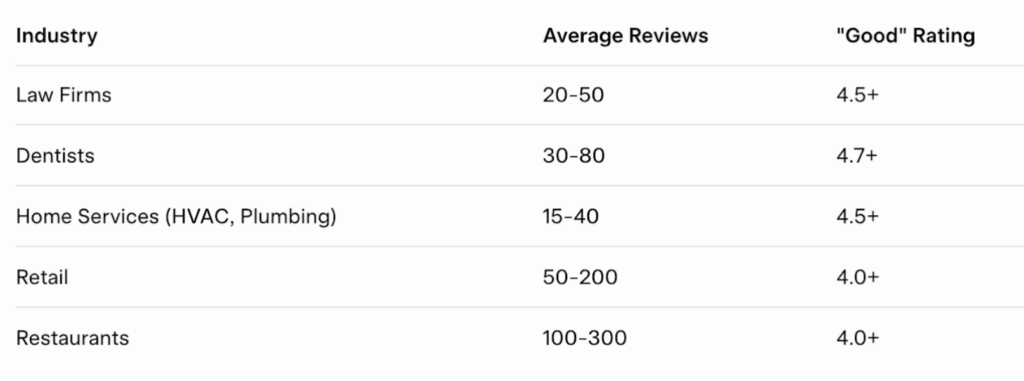
For law firms specifically: if you’re under 30 reviews, that’s your first priority. Once you hit 50+ reviews at a 4.5+ rating, you can start worrying about other SEO factors.
The numbers are different in every market. In a small town, 15 reviews might make you the king. In a big city, you’ll need hundreds to compete.
How To Get An Instant Boost To Your Google Reviews
If you don’t have a process to collect reviews in place right now, you probably have a huge opportunity to get 10-100 reviews quickly depending on your industry.
Be sure to spread this out so that you’re not collecting a whole bunch of 5-star reviews in a couple of days. Even if the reviews come from your clients it could raise a red flag with Google.
When a new user signs up for Prosperly this is the very first thing we do with them to jump start their Google review collection. Just a quick upload of past customers and the software does the rest.
Common Mistakes to Avoid
Let’s end with what NOT to do.
Buying Fake Reviews
This is going to be tempting. There are services that sell reviews. Don’t buy fake Google reviews.
Google has gotten incredibly sophisticated at detecting fake reviews. They’ve used AI to increase fake review removal by 40% in recent years.
And if you get caught? Your business can be penalized. Permanently.
Incentivizing Positive Reviews
You can’t pay for reviews or offer discounts for 5-star reviews. It’s against Google’s policies, and it can get your reviews removed.
What you CAN do: offer a small incentive for ANY review (positive or negative). That’s allowed.
I’ve seen a brand new donut shop collect hundreds of reviews in a weekend by offering a free donut in exchange for a review.
It was a genius way to build up social proof instantly for the new shop.
But be careful – incentivizing reviews is a gray area that many local businesses avoid entirely.
Ignoring Reviews
Every review deserves a response. It’s a ranking factor, and it’s good customer service. Set a calendar reminder if you have to.
Response Templates That Sound Robotic
Personalize your responses. Use the customer’s name. Reference something specific they said. It takes 30 seconds and makes a massive difference.
Asking Too Soon or Too Late
Timing matters. Ask right after the positive experience, when the emotions are still fresh. Don’t wait days or weeks.
Tools & Resources
If you’re serious about review management, here are the tools I’d recommend:
- Google Business Profile – Your home base
- Review generation platforms – Prosperly, Podium, BirdEye
- Review monitoring – SEMrush, LocalFalcon
- Automation tools – For email/SMS sequences you can use Prosperly.
Each has its pros and cons. I’ll cover these in depth in a future post.
How Much Is A Google Review Worth?
Let’s talk ROI.
The average customer who leaves a review spends 25% more than one who doesn’t.
That’s partly selection bias (happier customers leave reviews), but it’s also the halo effect – leaving a review makes someone feel more connected to your business.
Here’s a concrete example:
Say you’re a law firm. One new client is worth $3,000 on average. If better reviews means just one extra client per month, that’s $36,000 in annual revenue.
What did a review cost you? Nothing but asking.
That’s the power of this strategy.
Quick Start Checklist
Want to get started right now? Here’s your action plan:
- ☐ Get your review link from Google Business Profile
- ☐ Shorten it with a URL shortener
- ☐ Send your first review request email/SMS to recent customers
- ☐ Set a calendar reminder to respond to every review
- ☐ Train your team to ask in person
- ☐ Set up monitoring for your business name
- ☐ Check your competitors’ review counts
- ☐ Aim for 5 new reviews per month initially
- ☐ Target 4.5+ star average rating
- ☐ Review your numbers quarterly
Google Review Collection Should Be A Top Priority For Your Business
Google reviews are one of the most powerful – and underused – local SEO weapons available. They cost nothing but time. They signal trust to Google and to potential customers. And they’re entirely within your control.
The businesses that win at local SEO aren’t the ones with the biggest budgets. They’re the ones who show up consistently, ask for reviews, respond to every customer, and build a reputation over time.
This guide gives you everything you need to get started. The rest is execution.
Now it’s your turn. Pick one thing from this checklist and do it today. Then pick another tomorrow.
Get out there and start asking.
Stop Chasing Down Happy Clients For Reviews
Hey I’m Adam White and I’ve been helping businesses rank on Google for over 20 years.
I know exactly how frustrating it can be to try to get your happy clients to leave you a review, even after they promised they would.
So I built a platform to make it super easy for you to collect reviews from your happy clients while convincing unhappy clients to leave in-house feedback instead.
Best part about it is you don’t have to chase down happy clients anymore because the software follows up automatically for you.

Want to see how Prosperly puts review collection on autopilot?
Why You Should Use Prosperly
Put a proven system in place
Collect reviews automatically
Redirect unhappy clients
Waiting and hoping for your clients to leave reviews is not a strategy. Prosperly will proactively help you collect reviews consistently.
Our app integrates with almost all case management platforms and CRM’s. This means we can automate the review collection process.
Worried about unhappy clients leaving a negative review? Prosperly helps redirect them to leave in-house feedback instead.

Tony Smith The Smith Firm
“We only had 7 Google reviews and within the first 10 days we collected 14 new 5-star reviews from our clients and have a real system in place to keep growing. Couldn't recommend Prosperly enough!”

Kyle Flentje Flentje Law
"Easy to use, been great for my business. The customer service and onboarding process were also very smooth. Would recommend to anyone."

Gledis Bozo Selami Law
"Since implementing Prosperly, we have seen a dramatic increase in positive Google reviews easily tripled compared to before. Just as importantly, the system allows us to capture internal feedback, which helps us strengthen our client service even further."

Rudy Ledesma Team Ledesma Allstate
“Prosperly has outperformed any other strategy we’ve tried. There’s a real boost in inquiries with Prosperly and new clients coming through the door.”
How It Works
Step 1: We put a proven system in place
Step 2: You collect reviews automatically
Step 3: Your Google reviews skyrocket
We help you implement our proven system that will do the review outreach for you to collect reviews.
We can integrate with most case management platforms to put the system on autopilot.
You keep providing great service and watch as 5-star reviews come in automatically and consistently.